1. Caching is not easy — a bit of history
Alan is a health insurance platform serving multiple countries, powered by a Python/Flask backend with hundreds of web workers and RQ workers (queuing system).
flowchart LR
    Users(("Users")) --> Web["Web Workers<br/>(Flask/Gunicorn)"]
    Web <--> Redis[("Redis")]
    Web -- enqueue --> RQ["RQ Workers"]
    RQ <--> Redis
    Cron["Cron"] -- enqueue --> Redis
And of course, we have some caching.
In appearance, the caching system we used was simple: we used Flask Caching, with a single Redis backend. However, in reality our code was sprinkled with the use of different caching mechanisms.
There were more than six different ways to cache data across the codebase:
- Local memory —
functools.lru_cache, ad-hoc dictionaries with no expiration
- Redis with LRU — Flask-Caching, Redis only, no local RAM layer
- Simple dictionaries — plain Python dicts used as caches, no TTL management
- PostgreSQL — some data was cached directly in Postgres tables, with ad-hoc expiration and deletion management
- RQ job results — engineers were using the results of RQ background jobs as a makeshift cache, accessing them later instead of recomputing
- Directly storing to Redis — crafting cache keys manually, with various expiration rules.
- other variations…
None of these approaches were standard. There was very little observability — no way to know what was cached, how much memory it consumed, or whether stale data was being served. The only administration tool was old, and it could do exactly one thing: invalidate all of Redis caches at once (but nothing about local RAM cached values).
I decided to tackle the systemic problem. The plan was to survey all existing caching methods, understand each team’s needs, and then build a single internal product — an adaptive, hybrid cache that would work both in local memory and on Redis, with proper observability, monitoring, and administration tools, and with a set of advanced features that none of the existing approaches could offer.
After a few months of work, Alan Cache was born. It’s a Python library that makes caching dead-simple for the common case while offering powerful capabilities for the hard ones. In addition, it provides features that were thought impossible before. Here is a shortlist of its interesting features:
- Two interfaces — a
@cached_for(hours=1) decorator for the 90% case, plus a direct get/set/delete API for manual control
- Hybrid RAM + Redis storage — local RAM for sub-millisecond reads, shared Redis for cross-process persistence, both layers managed transparently
- Async background computation — expensive functions compute in background workers while stale data is served
- Partial cache invalidation — purge only the entries matching specific arguments, not the entire function’s cache
- Distributed invalidation — propagate deletions across hundreds of workers without pub/sub or external message brokers
- Atomic Writes — avoid double-writing cache values with a choice between optimistic (
at_least_once) and pessimistic (at_most_once) strategies. Useful when creating side effects
- Periodic refresh — keep hot caches warm automatically via scheduled recomputation
- Cache warming on startup — pre-populate critical entries before the first web request hits
- Object-lifetime expiration — cache tied to an object’s lifecycle, automatically cleaned up on garbage collection
- Request-scoped caching — deduplicate expensive calls within a single HTTP request, auto-cleanup on response
- Conditional caching — skip the cache based on runtime conditions (feature flags, user state, HTTP method)
- Full observability — Datadog metrics per function, an admin API to browse and purge keys, and an internal tool to explore cache state in production
Today, Alan Cache is very robust and hasn’t significantly changed in years. It has 258 usages across the codebase.
This article presents Alan Cache’s features, from simplest to most complex, the use cases and the technical solutions. The goal is that you get inspired by this solution and get to build your own variation to meet your caching needs.
2. The Simplest Case — @cached_for
One decorator. One line. It works.
@cached_for(hours=1)
def get_product_catalog(country: str) -> dict:
    return fetch_from_database(country)
The first call runs the function’s code, computes the value and stores the result in both local RAM and Redis. Subsequent calls return the cached value — from RAM if available (sub-millisecond), from Redis otherwise (1-5ms). After one hour, the entry expires and the next call recomputes it.
That’s it. No configuration, no setup, no boilerplate.
@cached_for is syntactic sugar for @cached(expire_in=timedelta(hours=1)). It accepts weeks, days, hours, minutes, seconds — any combination. Under the hood, @cached is the real engine (~1500 lines, 20+ parameters), but you rarely need to touch it directly.
This simple form covers 173 out of 258 caching usages in the codebase — the 80% case.
3. Under the Hood — The Two-Layer Architecture
When you write @cached_for(hours=1), here’s what actually happens:
flowchart TB
    F["🔧 Your Function<br/>@cached_for(hours=1)"]
    L1["⚡ Layer 1: RAM<br/>SimpleCache — per-process<br/>< 1ms"]
    L2["🗄️ Layer 2: Redis<br/>shared — cross-process — persistent<br/>1–5ms"]

    F --> L1
    L1 -- miss --> L2
AlanCache manages four internal cache backends:
| Backend |
Type |
Purpose |
shared_cache |
Redis |
Primary shared storage, swallows deserialization errors |
shared_cache_atomic |
Redis |
Atomic writes via WATCH/MULTI/EXEC |
local_cache |
SimpleCache |
Fast local RAM with serialization |
local_cache_no_serializer |
SimpleCache |
Local RAM storing objects as-is (ORM models, etc.) |
Why four and not two? I couldn’t cleanly make a single Redis backend support both atomic and non-atomic writes, and I needed a serialization-free local cache for objects that don’t pickle well.
The lookup order on get:
def get(self, key: str) -> Any:
    if self.local_cache.has(key):
        return self.local_cache.get(key)
    elif self.local_cache_no_serializer.has(key):
        return self.local_cache_no_serializer.get(key)
    elif self.shared_cache.has(key):
        return self.shared_cache.get(key)
    return self.shared_cache_atomic.get(key)
The AlanCache singleton is instantiated at module level:
It initializes from environment variables if available, or falls back to defaults (SimpleCache locally, NullCache for Redis). This means the library works in tests without any Redis connection — it gracefully degrades.
Beyond Flask-Caching. I reimplemented the parts of Flask-Caching I needed — the backend factory (dispatching to Redis/SimpleCache/Null based on config) and the core decorator machinery — without the Flask app context dependency. Cache.init_from_config() takes a plain dict, not a Flask app object. This lets the cache work from RQ workers, CLI scripts, and anywhere else outside of a Flask request context.
4. Manual Control — The get/set/delete API
Not everything is a decorator. Sometimes you compute a value in one place and need to cache it for use elsewhere. Or you need to cache something that isn’t a function return value. For those cases, alan_cache exposes a direct API:
from shared.caching.cache import alan_cache

# Store a value in both RAM and Redis for 1 hour
alan_cache.set("user:123:preferences", preferences, timedelta(hours=1))

# Retrieve it (checks RAM first, then Redis)
prefs = alan_cache.get("user:123:preferences")

# Delete from all layers
alan_cache.delete("user:123:preferences")

# Bulk operations
alan_cache.delete_many("key1", "key2", "key3")
foo, bar = alan_cache.get_many("foo", "bar")
The manual API writes to both layers and reads in the same priority order as the decorator: local RAM → local RAM (no serializer) → shared Redis → shared Redis (atomic).
5. Choosing Where to Cache
By default, @cached_for stores values in both layers — local RAM and shared Redis. But sometimes you want control over which layer is used.
RAM Only — No Redis
@cached_for(minutes=5, local_ram_cache_only=True)
def get_orm_objects() -> list[User]:
    return User.query.all()
No Redis round-trip, no serialization. They stay as Python objects in the process’s memory. Perfect for ORM models and other objects that don’t pickle well. The downside: each process has its own copy, and there’s no cross-process sharing.
For class methods, there’s an even simpler shortcut:
class DateHelper:
    @memory_only_cache
    def parse(self, date_string: str) -> date:
        return expensive_parse(date_string)
@memory_only_cache is a class descriptor — it implements __get__ so it works as an instance method decorator. No Redis, no serialization, no expiration. Permanent in-process cache. 36 usages across the codebase.
Skip Serialization
@cached_for(minutes=10, local_ram_cache_only=True, no_serialization=True)
def get_heavy_object() -> SomeComplexObject:
    return build_complex_object()
no_serialization=True stores the Python object as-is in RAM — no pickle roundtrip. Use this with local_ram_cache_only=True for objects that are expensive to serialize.
Redis Only — No Local RAM
@cached_for(hours=1, shared_redis_cache_only=True)
def get_volatile_data() -> dict:
    return fetch_frequently_changing_data()
Skip the local RAM layer. Useful when data changes often and you don’t want stale local copies. Every read goes to Redis.
Thread-Local Storage
class GoogleCalendarService:
    @thread_local_class_cache("calendar_client")
    def get_client(self) -> CalendarClient:
        return build_calendar_client(self.credentials)
For objects that shouldn’t be shared across threads — like API clients for external services. Each thread gets its own cached instance. Used for 7 integrations with external services.
6. Scoping Cache to a Request
Some computations are expensive but only relevant within a single HTTP request — like computing user permissions. You don’t want to hit the database 5 times in one request, but you also don’t want to cache permissions across requests (they might change).
@request_cached()
def get_user_permissions(user_id: int) -> set[str]:
    return compute_permissions(user_id)
@request_cached is RAM only, with a 30-second max TTL. The cache key includes the request’s object ID and a UUID, so there’s no cross-request leakage. When the request ends, a teardown_request callback deletes all cached keys automatically.
By default, it only caches on GET requests. You can change that:
@request_cached(for_http_methods={"GET", "POST"})
def get_feature_flags(user_id: int) -> dict:
    return compute_feature_flags(user_id)
Need to temporarily bypass the cache? Use the context manager:
with without_request_cached_for(get_user_permissions):
    # This call will skip the cache and recompute
    fresh_permissions = get_user_permissions(user_id)
6 usages in production — permissions, feature flags, and similar per-request computation.
How It Works Internally
@request_cached is built on top of @cached with a carefully constructed set of parameters. The magic is in how it isolates cache entries per request and cleans them up automatically.
Cache key isolation. The key prefix is a combination of the request’s Python object ID and a UUID generated once per request:
def cache_key_prefix() -> str:
    if has_request_context():
        request_id = id(request)
        request_uuid = getattr(request, "caching_uuid", None)
        if not request_uuid:
            request_uuid = uuid.uuid4()
            request.caching_uuid = request_uuid
        return f"{request_id}-{request_uuid}"
    return ""
Why both? id(request) alone would be enough within a single request — but Python can reuse memory addresses, so a previous request’s cached values could leak into a new request that happens to reuse the same memory address. The UUID makes each request’s namespace globally unique.
Automatic cleanup. When the decorator is first used, it registers a Flask teardown_request callback (once per app). This callback fires after every request and deletes all cached keys:
@current_app.teardown_request
def destroy_request_cached_entries(_response_or_exc):
    try:
        cache_keys: set[str] = getattr(request, "cache_keys", set())
        alan_cache.delete_many(*cache_keys)
    except Exception:
        pass  # teardown callbacks must never raise
How does it know which keys to delete? Every time a value is cached, an on_cache_computed callback appends the cache key to request.cache_keys:
def on_cache_computed(cache_key: str, value: Any) -> Any:
    if has_request_context():
        if getattr(request, "cache_keys", None) is None:
            request.cache_keys = set()
        request.cache_keys.add(cache_key)
    return value
HTTP method filtering. The method check is implemented as an unless callback passed to the underlying @cached decorator:
def _request_is_disabled_or_not_the_right_http_method(f, *args, **kwargs):
    if unless is not None and unless(f, *args, **kwargs):
        return True
    return bool(
        _cache_killswitch.get()
        or (not request)
        or (request.method not in http_methods)
    )
When the HTTP method doesn’t match, unless returns True, which means the cache is bypassed entirely — the function runs directly.
The killswitch. without_request_cached_for uses a ContextVar — a thread-safe, async-safe variable scoped to the current execution context:
_cache_killswitch: ContextVar[bool] = ContextVar(f"_cache_killswitch_{func.__qualname__}", default=False)

@contextmanager
def without_request_cached_for(func):
    func_killswitch = func.request_cached_killswitch
    token = func_killswitch.set(True)
    try:
        yield
    finally:
        func_killswitch.reset(token)
The token mechanism supports nesting — if you nest two without_request_cached_for blocks, each reset restores the previous state correctly.
The underlying call. Putting it all together, @request_cached delegates to @cached with these hardcoded parameters:
cached(
    expire_in=timedelta(seconds=30),       # safety net TTL
    local_ram_cache_only=True,             # no Redis round-trip
    cache_key_with_func_args=True,         # include arguments in key
    cache_none_values=True,                # None is a valid cached result
    unless=_request_is_disabled_or_not_the_right_http_method,
    cache_key_prefix=cache_key_prefix,     # request-scoped prefix
    on_cache_computed=on_cache_computed,    # track keys for cleanup
)
The 30-second TTL is a safety net, not the primary cleanup mechanism — teardown_request handles that. But if something goes wrong and the teardown doesn’t fire, values still expire quickly.
7. Conditional Caching
Sometimes you want to cache most calls but skip the cache for specific cases — guest users, admin debugging, certain feature flags.
@cached_for(
    minutes=30,
    unless=lambda func, user_id, *args, **kwargs: user_id is None,
)
def get_user_preferences(user_id: int | None) -> dict:
    return fetch_preferences(user_id) if user_id else get_defaults()
When unless returns True, the cache is bypassed entirely — no read, no write. The unless callback receives the decorated function and all its arguments, so you can make decisions based on any input.
For simpler cases, unless can also be a no-arg callable:
@cached_for(minutes=10, unless=lambda: is_admin_mode())
def get_dashboard_data() -> dict:
    return compute_dashboard()
Caching None values. By default, None return values are not cached — the assumption is that None means “no result, try again.” If None is a valid result you want to cache, set cache_none_values=True:
@cached_for(hours=1, cache_none_values=True)
def find_user(email: str) -> User | None:
    return User.query.filter_by(email=email).first()
How It Works Internally
The unless bypass. The unless check happens at the outermost layer of the decorator chain — before any cache lookup or write. When unless returns True, the original function is called directly, with zero cache interaction:
def _wrap_with_disable_cache_and_register(*args, **kwargs):
    if _bypass_cache(unless, func, *args, **kwargs):
        kwargs.pop("_force_cache_update", None)
        return func(*args, **kwargs)  # straight to the original function
    return func6(*args, **kwargs)     # through all caching layers
This is a complete bypass — no cache read, no cache write, no metrics, no key tracking. It’s as if the decorator wasn’t there.
Two-signature detection. How does unless support both lambda: is_admin_mode() and lambda func, user_id, *args, **kwargs: ...? It inspects the callable’s signature at call time:
def _wants_args(f):
    spec = inspect.getfullargspec(f)
    return any((spec.args, spec.varargs, spec.varkw, spec.kwonlyargs))

def _bypass_cache(unless, func, *args, **kwargs):
    if alan_cache.disable_cache:
        return True
    if callable(unless):
        if _wants_args(unless):
            if unless(func, *args, **kwargs) is True:
                return True
        elif unless() is True:
            return True
    return False
If the callable accepts any parameters at all (positional, *args, **kwargs, keyword-only), it’s called with the decorated function and all its arguments. Otherwise, it’s called with no arguments. The check uses is True — not truthiness — so unless must explicitly return True to trigger a bypass.
The None caching problem. When a cache backend’s get() returns None, it’s ambiguous: does the key not exist, or was None the cached value? The behavior depends on cache_none_values:
# Inside the Flask cache layer's get logic:
rv = cache.get(cache_key)
if rv is None:
    if not cache_none:
        found = False        # assume cache miss, don't even check
    else:
        found = cache.has(cache_key)  # actually check if key exists
With the default cache_none_values=False: a None return is always treated as a cache miss. The function runs again, and if it returns None again, that None is not stored — the function will run on every call. This is the right default for functions like “find user by email” where None means “not found, might exist later.”
With cache_none_values=True: an extra has() call distinguishes “key doesn’t exist” from “key exists and its value is None.” This costs one additional Redis round-trip, but it’s necessary when None is a meaningful result you want to cache — like “this feature flag doesn’t exist, stop querying for it.”
8. Cache Keys — How They Work and How to Control Them
Every cached function gets a deterministic key. Understanding the structure helps when debugging and when you need partial invalidation (next section).
Default Key Structure
{funcname}-{hash(args)}-{hash(kwargs)}-{hash(request_path)}-{hash(query_string)}
The function’s fully qualified name (module.qualname) is always prepended. Each part is MD5-hashed (inherited from Flask-Caching):
def _encode(t):
    return str(md5(str(t).encode()).hexdigest())
Controlling What Goes Into the Key
cache_key_prefix — add a static or dynamic prefix:
# Static prefix
@cached_for(hours=1, cache_key_prefix="v2")

# Dynamic prefix based on context
@cached_for(hours=1, cache_key_prefix=lambda: get_current_tenant_id())
cache_key_with_request_path and cache_key_with_query_string — include HTTP context in the key. Useful for caching entire page responses where the same function serves different URLs:
@cached_for(minutes=5, cache_key_with_request_path=True, cache_key_with_query_string=True)
def render_page() -> str:
    return expensive_template_rendering()
args_to_ignore, ignore_self, ignore_cls — exclude specific arguments:
@cached_for(hours=1, ignore_self=True)
def get_data(self, query: str) -> dict:
    # 'self' is excluded from the key, so all instances share the cache
    return self.db.execute(query)
cache_key_with_func_args=False — ignore all arguments entirely. Every call returns the same cached value regardless of inputs. Used with warmup_on_startup and async_refresh_every (covered later).
9. Partial Invalidation — Purge Surgically
This is where cache key design pays off.
Consider a function that caches product definitions by three parameters:
@cached_for(
    hours=24,
    cache_key_with_full_args=True,
)
def get_product_definition(product_type: str, country: str, version: int) -> dict:
    return fetch_product_from_database(product_type, country, version)
The crucial difference is cache_key_with_full_args=True. Instead of hashing all arguments together into a single part, each argument gets its own hash slot:
# Default (cache_key_with_full_args=False):
get_product_definition-{hash((product_type, country, version))}

# With full_args:
get_product_definition-{hash(product_type)}-{hash(country)}-{hash(version)}
Now, when the “health” product type changes, you can purge just those entries:
alan_cache.clear_cached_func_some(
    get_product_definition,
    product_type="health",
)
How It Works Internally
- Introspects the function signature to figure out which arguments were provided and which were omitted
- Builds a glob pattern replacing omitted arguments with
*:
get_product_definition-{hash("health")}-*-*
- Delegates to async deletion — an RQ job scans the function’s
CACHED_FUNC_KEYS_{funcname} Redis SET using SSCAN with the glob pattern, deletes matching keys in batches of 1000, then broadcasts to all workers for local cache cleanup
About 10 functions use this in production. It’s marginal in volume but critical in impact — it lets you have a simple caching system for product definitions, contract rules, and similar domain data, with surgical invalidation when only one product or rule changes. No need to manage dozens of specific cache keys manually.
For other invalidation needs:
# Delete one specific cached value (exact args match)
alan_cache.clear_cached_func(get_product_definition, "health", "FR", 3)

# Delete ALL cached values for a function
alan_cache.clear_cached_func_all(get_product_definition)
10. Distributed Invalidation — The Hard Problem
With up to 300 RQ workers and multiple web server processes, each running its own local SimpleCache, how do you propagate a cache deletion across all of them?
This is the hardest problem Alan Cache solves. The answer is a three-stage protocol that doesn’t require pub/sub, message brokers, or any external infrastructure beyond Redis.
First, delete matching keys in the current process using re2 regex:
def _delete_local_cache_keys_from_patterns(patterns_to_del: list[str]) -> set[str]:
    patterns_to_del = ["^" + p + "$" for p in patterns_to_del]
    regex = re2.compile("|".join(patterns_to_del))
    deleted_keys = set()
    for cache in [alan_cache.local_cache.cache, alan_cache.local_cache_no_serializer.cache]:
        _cache = cache._cache
        to_del = [key for key in _cache if re2.search(regex, key)]
        for key in to_del:
            del _cache[key]
        deleted_keys.update(to_del)
    return deleted_keys
I use Google’s RE2 library instead of Python’s re for two reasons: RE2 guarantees linear-time matching (no exponential blowup on pathological patterns), and it’s immune to ReDoS attacks from crafted patterns. Since deletion patterns come from function names and argument hashes, RE2’s safety guarantees matter.
Stage 2: Redis Async Delete
An RQ job (on the CACHE_BUILDER_QUEUE) scans the function’s key set and deletes matching Redis keys in batches of 1000:
for funcname, filter_pattern in funcnames_and_filters:
    set_name = CACHED_FUNC_KEYS_SET_PREFIX + funcname

    if filter_pattern == "*":
        keys = list(redis.smembers(set_name))
        if keys:
            for batch_keys in group_iter(keys, 1000):
                redis.delete(*batch_keys)
            redis.delete(set_name)
    else:
        keys_to_delete = []
        for key_bytes in redis.sscan_iter(set_name, match=...):
            keys_to_delete.append(key_bytes)
        for batch_keys in group_iter(keys_to_delete, 1000):
            redis.delete(*batch_keys)
            redis.srem(set_name, *batch_keys)
Stage 3: Broadcast via ZSET
After Redis keys are deleted, the job needs to tell every other worker to clean up its local RAM cache. It does this by adding deletion patterns to a Redis Sorted Set, CACHED_FUNCS_TO_DELETE, scored by the Redis server’s epoch time (not the local clock — avoids clock drift issues across machines):
(epoch, _) = redis.time()
patterns_for_dict = [
    f"{funcname}-{filter_pattern}".replace("*", ".*")
    for funcname, filter_pattern in funcnames_and_filters
]
redis.zadd(CACHED_FUNCS_TO_DELETE, dict.fromkeys(patterns_for_dict, epoch))
redis.expire(CACHED_FUNCS_TO_DELETE, 3600)  # 1h TTL
Worker Pickup: Piggyback on Cache Access
Workers don’t poll a dedicated channel. Instead, every cached function call checks (at most every 5 minutes) if there are new patterns in the ZSET:
DELETION_CHECK_FREQUENCY_SECS = 60 * 5

def _cleanup_local_cache_keys() -> None:
    global _last_time_check_for_deletion
    now = datetime.now(UTC)
    epoch = int(_last_time_check_for_deletion.timestamp())
    if patterns_to_del_bytes := alan_cache.redis.zrangebyscore(
        CACHED_FUNCS_TO_DELETE, epoch, "+inf"
    ):
        patterns_to_del = [p.decode("utf-8") for p in patterns_to_del_bytes]
        _delete_local_cache_keys_from_patterns(patterns_to_del)
    _last_time_check_for_deletion = now
Consistency guarantee. The ZSET expires after 1 hour. Workers are recycled every 30 minutes. This means even if a worker doesn’t access the cache for a while, it will be replaced by a fresh one before the patterns expire — no worker ever misses an invalidation.
Function Registry
Every cached function registers its fully qualified name in the CACHED_FUNCS Redis SET on first call:
if funcname not in _registered_funcnames:
    alan_cache.redis.sadd(CACHED_FUNCS, funcname)
    _registered_funcnames.add(funcname)
This makes all cached functions discoverable by admin tools. Each function’s keys are tracked in a dedicated SET (cached_func_keys_{funcname}), enabling efficient key counting, pattern-matching deletion, and space estimation.
11. Atomic Writes — Caching Functions with Side Effects
The Problem
Not all cached functions are pure. Some compute a value and produce a side effect — sending a Slack message, creating a channel, provisioning a resource, calling an external API that charges money.
Consider a cached function that sends a Slack notification as part of an automated task. Two workers race — both see an empty cache, both compute, both send the message. The user gets a duplicate notification. This was a real bug at Alan.
The issue isn’t the redundant computation. It’s the duplicate side effect. Whenever a cached function does something beyond returning a value, a race condition on cache miss becomes a correctness problem. You need a guarantee about how many times the function body actually executes.
Alan Cache solves this with two strategies, named after distributed systems concepts. Both ensure that concurrent cache misses don’t cause the function to run multiple times uncontrollably.
at_least_once — Optimistic Concurrency
The idea: let everyone compute, but only the first write to the cache wins.
This uses Redis’s WATCH/MULTI/EXEC transaction mechanism — the same primitive used for optimistic concurrency control in databases. Here’s how it works:
WATCH the cache key- Compute the value (side effects may happen here)
- Start a
MULTI transaction, SET the key, EXEC
- If another process wrote the key between the
WATCH and EXEC, Redis raises WatchError
- On
WatchError: retry — but now the key exists, so the cache hit returns the value immediately
def _retry_on_watch_exception(*args, **kwargs):
    retval = None
    while True:
        try:
            retval = func3_cache_shared(*args, **kwargs)
            break
        except WatchError:
            continue
    return retval
Multiple processes may compute the value (hence “at least once”), but only one write to the cache succeeds. The others discover the cached value on retry and don’t write again.
When to use: functions where the side effect is idempotent or cheap enough that running it twice is acceptable — e.g. fetching data from an external API (you pay the latency twice, but no visible harm). The guarantee here is about cache consistency (no double-write), not about side-effect uniqueness.
at_most_once — Pessimistic Locking
The idea: only one process runs the function, everyone else waits for the result.
This is the strategy for non-idempotent side effects — when running the function twice would cause visible problems. Instead of computing the real value, the winning process first writes a lock sentinel to the cache:
def _build_at_most_once_lock(*args, **kwargs) -> str:
    return f"__atomic_lock_proc:{_get_proc_thread_id()}"
The process ID and thread ID identify who holds the lock. Now:
- The winning process (whose PID matches the sentinel) runs the function — side effects happen exactly once — then replaces the sentinel with the real value
- All other processes detect the sentinel (it starts with
__atomic_lock_proc:), sleep 10ms, and retry
- Eventually, the real value appears and everyone gets it
def set_real_value_after_lock_is_set(*args, **kwargs):
    key = make_cache_key(*args, **kwargs)
    while True:
        retval = func3_handle_atomic_conflict(*args, **kwargs)
        retval_str = str(retval or "")
        if not retval_str.startswith("__atomic_lock_proc:"):
            return retval  # Real value ready
        proc_thread_id = retval_str.split(":")[1]
        if proc_thread_id == _get_proc_thread_id():
            # I won the lock — compute and store
            computed_val = orig_func3(*args, **kwargs)
            alan_cache.set(key, computed_val, expire_in or timedelta(seconds=0))
            return computed_val
        # Another process holds the lock — wait
        time.sleep(0.01)
When to use: functions with non-idempotent side effects — sending a Slack message, creating a channel, provisioning a cloud resource, calling a billing API. The function runs exactly once; everyone else gets the cached result.
Production Usage
@cached_for(hours=24, atomic_writes="at_least_once")
def get_user_lifecycle_data(provider: str) -> dict:
    return fetch_from_external_api(provider)
70 usages across 39 files — heavily used in internal tooling that integrates with external providers. With up to 300 concurrent RQ workers, I haven’t observed congestion.
12. Async Background Computation — Never Block the User
Some computations take 30+ seconds — aggregating data from external APIs, generating reports, scanning infrastructure. You can’t make the user wait.
@cached_for(minutes=10, async_compute=True)
def get_infrastructure_status() -> dict:
    return scan_all_kubernetes_clusters()  # Takes 45 seconds
When async_compute=True:
- First call: enqueues an RQ job on
CACHE_BUILDER_QUEUE, raises AsyncValueBeingBuiltException. The caller catches this and shows a loading state.
- While computing: subsequent calls keep raising the exception.
- Once computed: the value lands in Redis, and subsequent calls return it instantly.
The RQ Serialization Trick
RQ serializes function references as strings like module.function_name and uses import_attribute to load them. But for class methods, the path has two levels (module.Class.method), which import_attribute can’t handle.
The workaround: I dynamically inject a module-level sync wrapper:
sync_func_name = f"_sync_{func.__qualname__}"

@functools.wraps(func)
def _sync_func(*args, **kwargs):
    alan_cache._running_in_an_async_worker += 1
    try:
        ret = func(*args, **kwargs)
    finally:
        alan_cache._running_in_an_async_worker -= 1
    return ret

_sync_func.__qualname__ = sync_func_name
sync_func_module = getmodule(func)
setattr(sync_func_module, sync_func_name, enqueueable(_sync_func))
The _running_in_an_async_worker counter solves another subtle problem: recursive async. If an async-cached function calls another async-cached function, the inner one would also try to enqueue a job and raise AsyncValueBeingBuiltException — crashing the outer job. The counter forces inner calls to run synchronously when already inside an async worker.
13. Keeping Caches Warm — Periodic Refresh & Startup Warming
Periodic Refresh
Some data should always be fresh in the cache — Kubernetes cluster state, Cloudflare deployments, CI pipeline configs. You don’t want the first user after expiry to pay the recomputation cost.
@cached_for(
    minutes=10,
    async_compute=True,
    async_refresh_every=timedelta(minutes=5),
)
def _get_applications() -> dict[str, Any]:
    return run_cli_command(...)
async_refresh_every registers the function and its refresh period in a Redis HASH:
alan_cache.redis.hset(CACHED_FUNCS_TO_REFRESH, funcname, to_seconds(async_refresh_every))
An external cron job triggers the refresh_periodic_cached_values() RQ command, which iterates all registered functions and recomputes the ones that are due:
def _refresh_periodic_cached_values() -> None:
    cached_funcs = alan_cache.redis.hgetall(CACHED_FUNCS_TO_REFRESH)
    cached_funcs_last_run_start = alan_cache.redis.hgetall(
        CACHED_FUNCS_TO_REFRESH_LAST_RUN_FINISHED
    )
    for func_name, period_sec in cached_funcs.items():
        last_run_start = cached_funcs_last_run_start.get(func_name, 0)
        if int(last_run_start) + int(period_sec) < time.time():
            func = import_attribute(func_name_str)
            try:
                func(_force_cache_update=True)
            except AsyncValueBeingBuiltException:
                pass  # Already running, check next time
When combined with async_compute=True, the refresh happens in a background worker — the old cached value continues to be served until the new one is ready. Users never see a loading state after the first computation.
Constraints: minimum 5-minute granularity, must be shorter than expire_in, can’t be used on functions that take arguments — there’s no way to know which arguments to call them with.
9 functions use periodic refresh in production.
Startup Warming
For critical cache entries that should be ready before the first request:
@cached_for(hours=1, warmup_on_startup=True, async_compute=True)
def get_system_config() -> dict:
    return load_system_configuration()
On application startup, a before_first_request callback eagerly computes the value:
@current_app.before_first_request
def _warmup_cache():
    if not alan_cache.disable_cache:
        timeout_end = time.monotonic() + warmup_timeout.total_seconds()
        while True:
            try:
                func7(_force_cache_update=True)
                break
            except AsyncValueBeingBuiltException:
                pass
            if time.monotonic() > timeout_end:
                raise TimeoutError(f"warming up cache value took more than {warmup_timeout}")
            time.sleep(0.1)
It polls until the value is computed or the warmup_timeout (default: 10 seconds) expires. This prevents cold-start penalties — the first real user request gets a cache hit.
Constraints: same as periodic refresh — no arguments, no request-path keys.
14. Object-Lifetime Caching
Sometimes cache entries should live as long as a specific Python object — and be automatically cleaned up when that object is garbage collected.
class RequestContext:
    @cached(local_ram_cache_only=True, expire_when="object_is_destroyed")
    def get_expensive_data(self, key: str) -> dict:
        return compute_expensive_data(key)
When expire_when="object_is_destroyed":
- Alan Cache injects a
__del__ destructor on the class (preserving any existing destructor)
- It tracks all cache keys created for each instance in an
_instance_keys dict, indexed by class name and instance identity
- When the object is garbage collected, the destructor fires and calls
alan_cache.delete_many(*keys) to clean up all associated cache entries
def destructor(self):
    keys = _instance_keys.get(class_name, {}).get(str(self), set())
    alan_cache.delete_many(*keys)
    _instance_keys.get(class_name, {}).pop(str(self), None)
    if existing_destructor is not None:
        return existing_destructor(self)
Must be paired with local_ram_cache_only=True — this feature is designed for in-memory objects whose lifecycle is tied to something transient like a request handler or a temporary computation context.
15. Observability & Admin
Observability was a first-class design goal — not an afterthought. One of the main pain points with the old caching mess was having no visibility into what was cached.
Metrics
Every cache get and set is wrapped with Datadog timing metrics:
metrics.timed(f"cache.{name}.duration", tags=[
    f"cache_type:{cache_type}",
    f"async:{async_compute}",
    f"func_name:{funcname}",
])
This gives me cache.get.duration and cache.set.duration histograms with per-function granularity. Since Datadog histograms include count, I also get hit rate and throughput for free.
Admin API
Internal endpoints for cache inspection:
| Endpoint |
Method |
Purpose |
/alan_cache/funcnames |
GET |
List all cached functions with code owners |
/alan_cache/funcnames |
POST |
Delete all keys for specified functions |
/alan_cache/function_keys |
GET |
List keys for a specific function |
/alan_cache/count_keys_and_space |
GET |
Key counts and estimated memory per function |
/alan_cache/default_set_keys |
GET |
Paginated key browser (sortable by name or size) |
The admin API itself uses Alan Cache — the _count_keys_and_space function is decorated with @cached_for(minutes=60, async_compute=True, async_refresh_every=timedelta(minutes=30)). It uses Redis PIPELINE and MEMORY USAGE commands to estimate space without transferring values.
Function Discovery
The CACHED_FUNCS Redis SET serves as a live registry. Combined with per-function key SETs (with alphabetical and size-sorted variants), it provides:
- Complete list of which functions are cached in production
- Key count per function
- Estimated memory consumption per function
- Code ownership mapping (via
get_code_owners_of_function)
16. The Admin Dashboard — Exploring Cache State in Production
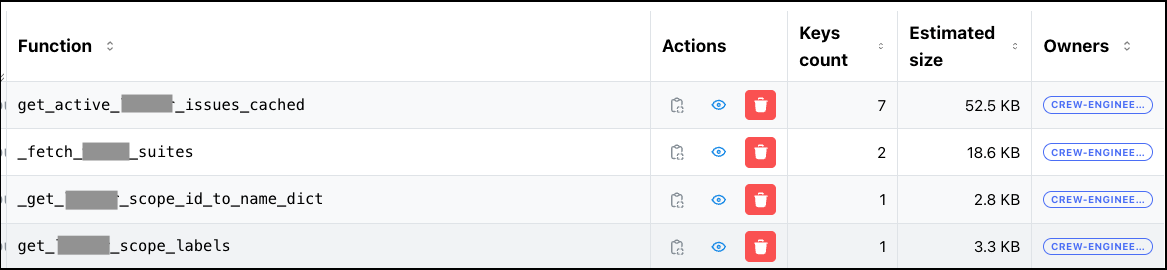
The API endpoints from Chapter 15 power a React-based internal admin dashboard. It turns raw Redis data into something anyone on the team can browse — no Redis CLI required.
Functions Overview
The main view lists every cached function in production:
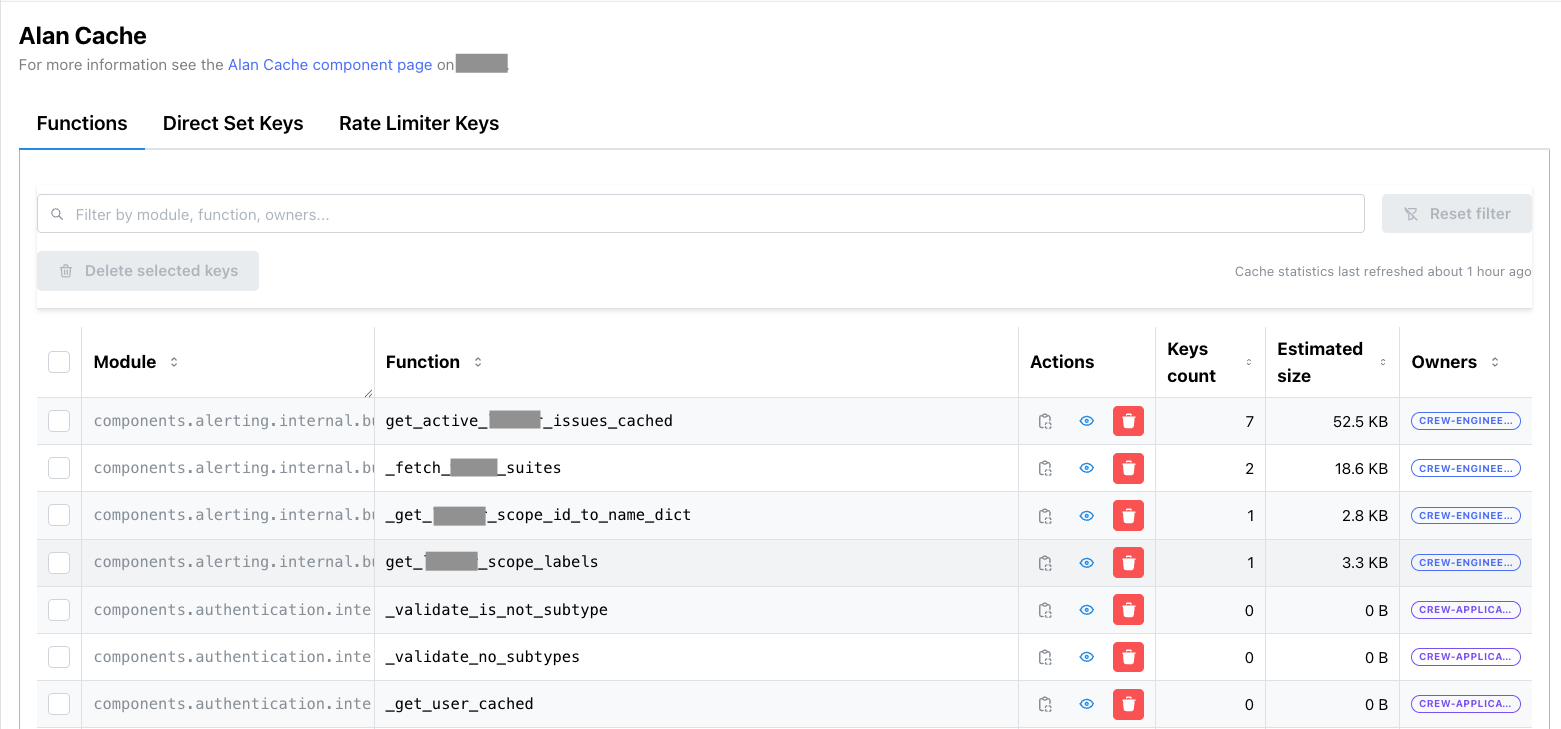
Each row shows:
- Module & Function name — which Python function is cached
- Key count — how many cache entries exist for this function
- Estimated memory — computed via Redis
MEMORY USAGE across all keys (itself cached and refreshed async every 30 min)
- Code owners — extracted from CODEOWNERS, so you know who to ping
- Actions — delete all keys for a function, or drill down into individual keys
The search bar at the top filters by function name or module. The bulk delete button lets you wipe multiple functions at once — useful after a deploy that changes return types.
Key Browser
Clicking a function drills into its individual cache keys:
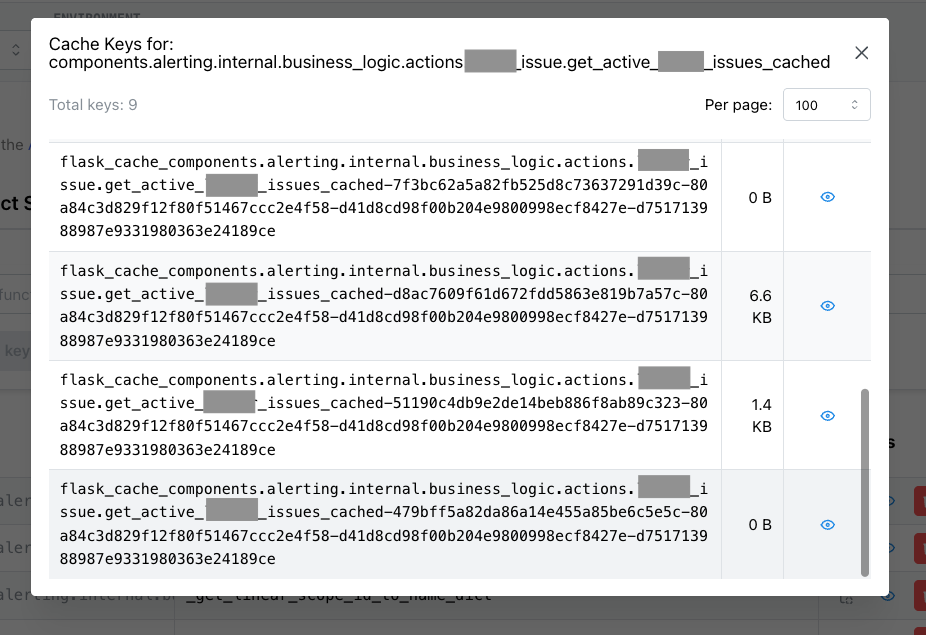
Keys are sortable by name or size. The key format is structured: flask_cache_{funcname}-{hash(arg₀)}-{hash(arg₁)}-.... You can spot outliers — a single key consuming disproportionate memory usually means someone is caching a large queryset that should be paginated.
Value Inspector
Clicking a key shows its deserialized value:
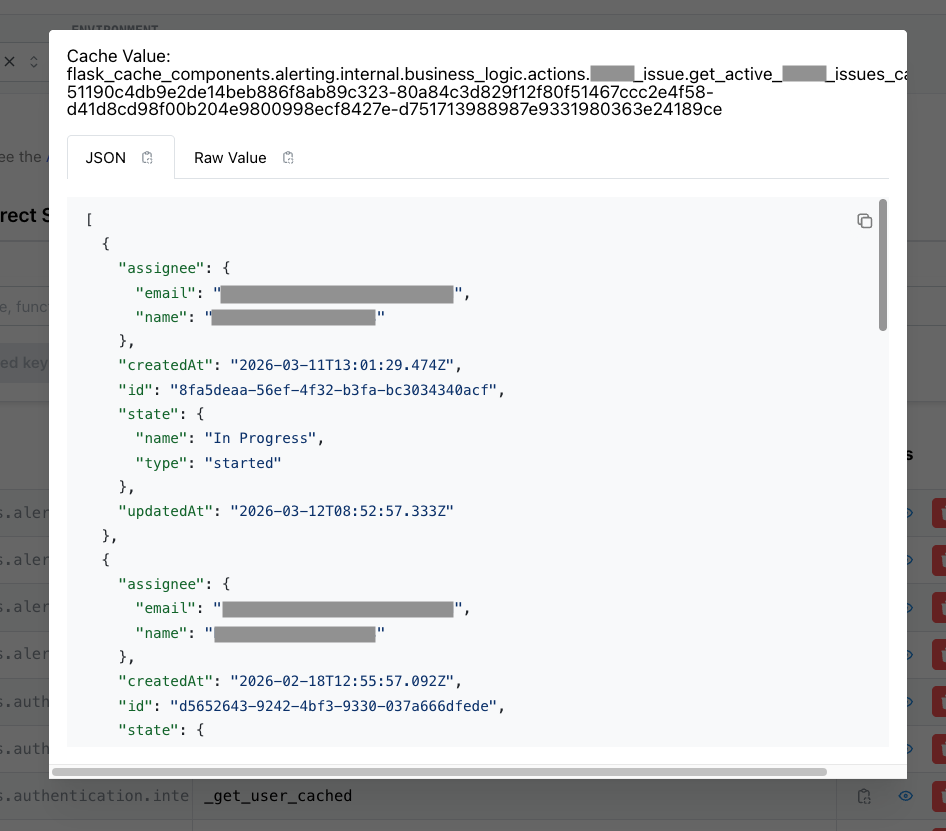
The dashboard deserializes the pickled value and renders it as formatted JSON. This is invaluable for debugging — you can verify that the cached data matches expectations without adding print statements or breakpoints. For cached objects containing user data, the dashboard shows the actual field values (PII is visible only on the internal network).
17. The Full Picture
Now that you’ve seen every feature — from simple decorators to distributed invalidation, atomic writes, async computation, and observability — here’s the complete infrastructure that Alan Cache operates in:
flowchart TB
    Clients["🌐 Clients"]

    subgraph Gunicorn["Web Server (Gunicorn, ×N)"]
        W1["Worker 1<br/>🧠 Local RAM Cache"]
        W2["Worker 2<br/>🧠 Local RAM Cache"]
        Wn["Worker …<br/>🧠 Local RAM Cache"]
    end

    subgraph RQ["RQ Workers (up to 300, recycled every 30 min)"]
        R1["Worker 1<br/>🧠 Local RAM Cache"]
        R2["Worker 2<br/>🧠 Local RAM Cache"]
        Rn["Worker …<br/>🧠 Local RAM Cache"]
    end

    subgraph Redis["Redis"]
        subgraph Storage["Cache Storage"]
            STR["flask_cache_ funcname - hash args  — STR"]
        end
        subgraph Registry["Function Registry & Key Tracking"]
            SET1["CACHED_FUNCS — SET"]
            SET2["cached_func_keys_ funcname  — SET"]
            ZSET1["cached_func_keys_ funcname _alpha — ZSET"]
            ZSET2["cached_func_keys_ funcname _size — ZSET"]
        end
        subgraph Invalidation["Distributed Invalidation"]
            ZSET3["CACHED_FUNCS_TO_DELETE — ZSET<br/>1h TTL, checked every 5 min"]
        end
        subgraph Refresh["Periodic Refresh"]
            HASH1["cached_funcs_to_refresh — HASH"]
            HASH2["cached_funcs_to_refresh_last_run — HASH"]
        end
        subgraph Queue["Job Queues (RQ)"]
            LIST["CACHE_BUILDER_QUEUE — LIST"]
        end
    end

    Cron["⏰ Cron Job"]

    Clients -- HTTP --> Gunicorn
    Gunicorn -- "read/write + enqueue" --> Redis
    RQ -- "dequeue + read/write" --> Redis
    Cron -- "enqueues refresh jobs" --> Redis
Inside every worker process, the AlanCache singleton manages four cache backends — two local, two remote:
flowchart TB
    subgraph AlanCache["AlanCache singleton (one per process)"]
        subgraph Layer1["⚡ Layer 1 — Local RAM (per-process, < 1ms)"]
            LC["local_cache<br/>SimpleCache — pickled values"]
            LCNS["local_cache_no_serializer<br/>SimpleCache — raw Python objects (no I/O)"]
        end
        subgraph Layer2["🗄️ Layer 2 — Shared Redis (cross-process, 1–5ms)"]
            SC["shared_cache<br/>RedisCache — primary, swallows errors"]
            SCA["shared_cache_atomic<br/>RedisCache — WATCH/MULTI/EXEC writes"]
        end
    end

    LC -- miss --> LCNS
    LCNS -- miss --> SC
    SC -- miss --> SCA
18. Build vs Buy — Why Not Use an Existing Library?
I considered the existing Python caching landscape:
functools.cache / functools.lru_cache — Built into Python, zero dependencies. But strictly in-process RAM, no TTL support (cache has no expiration at all, lru_cache only evicts by size), no Redis layer, no invalidation beyond cache_clear() which wipes everything. We were already using lru_cache in places — it was one of the six fragmented approaches we wanted to consolidate- cachetools — Same idea as
functools.lru_cache but with more eviction policies (TTL, LFU, LRU). Still RAM-only, no Redis backend, no shared state across processes
- cache-tower — The closest in spirit: a multi-layer cache with RAM + Redis support. But it’s a minimal library focused on
get/set with TTL and LRU eviction — no decorator interface, no distributed invalidation, no partial invalidation, no atomic writes, no background computation
- dogpile.cache — Good two-layer support, but no distributed invalidation, no partial invalidation, no async computation
- aiocache — Multi-backend support (Redis, Memcached, in-memory) with a clean decorator API, but built entirely around
asyncio. Our stack is synchronous Flask + RQ — adopting aiocache would have meant either running an async event loop inside sync workers (fragile and complex) or migrating to an async framework first. It also lacked distributed invalidation, partial invalidation, and atomic writes
- redis-simple-cache — Thin decorator around Redis with TTL support. Redis-only, no local RAM layer — every read is a network round-trip. No partial invalidation, no atomic writes, no background computation. Too simple for our needs
- Flask-Caching itself — No local RAM layer, no atomic writes, no async computation, no partial invalidation
None of them gave me what I needed: a unified decorator with two-layer storage, partial invalidation, distributed cache deletion across 300+ workers, async background computation, and atomic writes with semantic choices (at_least_once vs at_most_once).
So I reimplemented the useful parts of Flask-Caching — the backend factory and decorator core — without the Flask app context dependency, and built everything else on top. The key inspiration from CHI (Perl) was the philosophy: one interface, infinite configurability, observable by default.
The trade-off is maintenance cost — ~1500 lines of decorator logic. But the return is total control: every feature in Alan Cache exists because a real production incident demanded it.
19. Numbers
All numbers from Datadog, February 2026. The two-tier architecture shows its value at scale: ~300–500M cache GETs per day, with RAM absorbing ~10x more writes than Redis. The Redis infrastructure itself is barely loaded — ~1% CPU, zero swap, ~200 GiB memory headroom per node — despite serving ~29K GET commands per second.
| Metric |
Value |
| Decorator usages across codebase |
258 |
@cached_for usages |
173 |
@cached usages |
36 |
@memory_only_cache usages |
36 |
@request_cached usages |
6 |
@thread_local_class_cache usages |
7 |
atomic_writes usages |
70 across 39 files |
async_refresh_every usages |
9 |
clear_cached_func_some usages |
~10 |
| Max concurrent RQ workers |
300 |
| Deletion check frequency |
5 minutes |
| ZSET expiry (broadcast) |
1 hour |
| Worker recycling interval |
30 minutes |
| Redis keys |
[XXX — prod numbers TBD] |
| Redis memory |
~111 GiB total across clusters |
| |
|
| Daily throughput |
|
| Cache GETs/day |
~300–500M (peak ~490M) |
| Cache SETs in RAM/day |
~80–170M (peak ~170M) |
| Cache SETs in Redis/day |
~5–25M (peak ~25M) |
| |
|
| Redis infrastructure |
|
| Redis GET cmd/s |
~29K |
| Redis SET cmd/s |
~9K |
| Redis memory (total) |
~111 GiB across clusters |
| Redis CPU |
~1% |
| Redis swap |
0 |
| |
|
| Core engine lines of code |
~1500 |
Summary (TL;DR)
Alan Cache is the in-house Python caching library I built at Alan in January 2023. Inspired by Perl’s CHI, it replaced many fragmented caching methods with one unified two-layer system.
The basics: @cached_for(hours=1) stores values in both local RAM (<1ms) and shared Redis (1-5ms). Covers 173 of 258 usages. A direct get/set/delete API handles the rest.
Storage control: choose RAM-only (local_ram_cache_only), Redis-only (shared_redis_cache_only), or both. Specialized decorators for class methods (@memory_only_cache), thread-local state (@thread_local_class_cache), and request-scoped computation (@request_cached).
Cache keys & invalidation: keys are structured as {funcname}-{hash(arg0)}-{hash(arg1)}-.... With cache_key_with_full_args=True, each argument gets its own slot, enabling clear_cached_func_some(func, product_type="health") to purge surgically.
Distributed invalidation: 3-stage protocol — local delete with RE2 regex → async Redis scan+delete in batches of 1000 → broadcast via ZSET scored by Redis server epoch. Workers pick up patterns piggyback-style every 5 min. ZSET TTL 1h + 30min worker recycling = no missed invalidations.
Side-effect safety: at_least_once (WATCH/MULTI/EXEC, optimistic, first write wins — for idempotent side effects) and at_most_once (lock sentinel + polling, pessimistic, exactly-once — for non-idempotent side effects). 70 usages, zero congestion with 300 workers.
Advanced: async background computation via RQ workers with dynamic function injection. Periodic refresh via external cron (9 functions). Startup warming with configurable timeout. Object-lifetime caching with __del__ injection.
Observability: Datadog metrics per function, admin API with key browser and space estimation, internal admin dashboard.
Result: No cache-related incidents since deployment.